skip to main
|
skip to sidebar
Digital Life
Sunday, February 17, 2008
How to Disable autorun all drive on WinXP
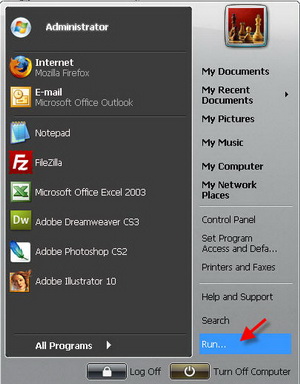
1. Goto start -> Run
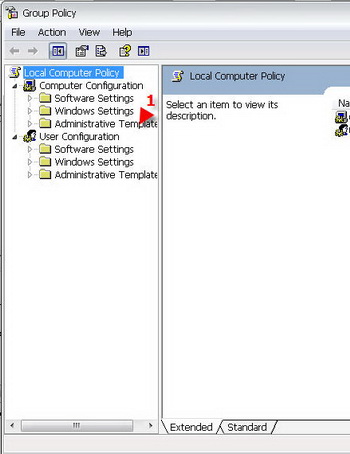
2. type gpedit.msc press enter
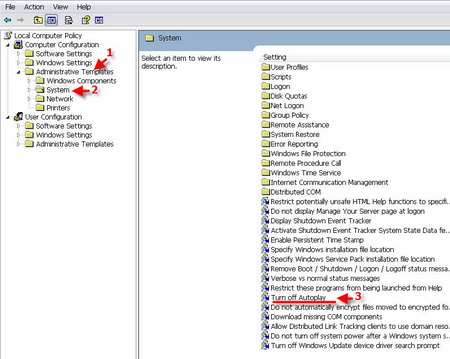
3. go to adminisstrative Templates
4. go to System and then Turn off Autoplay
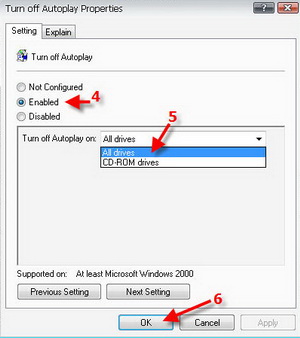
5. Click Enable All Drive and Click OK
*Support At least Microsoft Windows 2000
By: maamui
No comments:
Post a Comment
Newer Post
Older Post
Home
Subscribe to:
Post Comments (Atom)
Groups
acer
(1)
antivirus
(11)
aspire
(1)
data recovery
(18)
drive not ready
(1)
Hardware
(2)
internet
(2)
notebook
(1)
software
(10)
technology
(7)
trick
(8)
Blog Archive
►
2010
(1)
►
May
(1)
►
2009
(1)
►
June
(1)
▼
2008
(59)
►
July
(1)
►
April
(2)
►
March
(14)
▼
February
(34)
How To Secure Your Computer System?
What is Data Recovery?
The 6 Steps To Recovering Your Laptop Data
How To Recover From The Black Screen Of Death
Avoid Losing Data In Microsoft Outlook
Blue Screen Error - How To Solve Computer & Window...
How To Configure Hardrive For Copying-Cloning (IDE)
Data Recovery: Beginners Tips
Software Backup For Everyone
Tips For Data Recovery
Cheap Data Recovery Softwares - What Are Your Options
Has your computer started running slowly
Knowing The Basics Of Spyware
iPods are More Than Portable Music Players
3 Differences Between Viruses and Spyware
The Anatomy of Amazon's Kindle Reader
Famous Trojans - Tony Blair Trojan
Free Registry Cleaners Aren't Always Safe
Choose from the Top Spyware Software Tools of AdSp...
How to Disable autorun all drive on WinXP
5 Fun Free Software Sites
Computer Spyware Detection
How to Fix a Computer Crash
MSN Messenger Virus - Way to Remove MSN Messenger ...
Notebook Computers For Gaming, Upgrade Memory, Inc...
Free PSP Music - A Popular But Dangerous Solution
How To Play Music On PSP
Choosing The Best iPod For You
5 Tips to Maintain Your PC's Health
post
How To Prevent And Eliminate Spyware, Adware, And ...
Windows Keyboard Shortcuts
What is a Webcam, Thumb Drive and More!!
Lock folder
►
January
(8)
About Me
softwarestips
View my complete profile
03-01-2008


No comments:
Post a Comment